
Stock Android feels fine. Until you realize how much you are actually giving up.
I have spent a lot of time digging into mobile operating systems, what they do in the background, what permissions they really enforce, and how much control you actually have as a user. And the more I looked at Stock OS vs GrapheneOS, the more obvious it became that Stock OS is just not built for the user. It is built for Google, for carriers, and for data brokers. GrapheneOS is built for you.
This is not just another privacy nerd rant. This is a real breakdown of why GrapheneOS wins in basically every category that matters.
What We Mean By "Stock OS"
When I say Stock OS, I mean the Android that comes preinstalled on your Pixel, Samsung, OnePlus, whatever. Even "clean" Stock Android on a Pixel is still Google's Android.
It includes:
- Google Play Services with privileged, unrestricted system access
- Dozens of preinstalled Google apps you cannot fully remove
- Default telemetry and tracking that you can only partially opt-out of
- Carrier and manufacturer bloat if you are not on a Pixel
- Security that is good, but intentionally limited to not break Google's business model
It works. It is smooth. But it was never designed to put you in control.
What GrapheneOS Actually Is
GrapheneOS is not some sketchy custom ROM you flash with a random tool from XDA. It is a hardened, open source Android fork built specifically for Pixels. It is Android, but rebuilt with security and privacy as the core features, not afterthoughts.
A few things to get straight:
- It is not LineageOS. LineageOS is about customization and keeping old phones alive. GrapheneOS is about security.
- It does not break your apps. You can still run Google Play Services, but sandboxed like a normal app, with no special privileges.
- It is not just for journalists or paranoid people. It is for anyone who wants a phone that does what they tell it to do.
It is still Android. Your apps, your workflow, your UI - 95% the same. What changes is what happens under the hood.
Stock OS vs GrapheneOS: Head to Head
Let's break this down category by category.
1. Privacy: No Contest
This is where Stock OS completely falls apart.
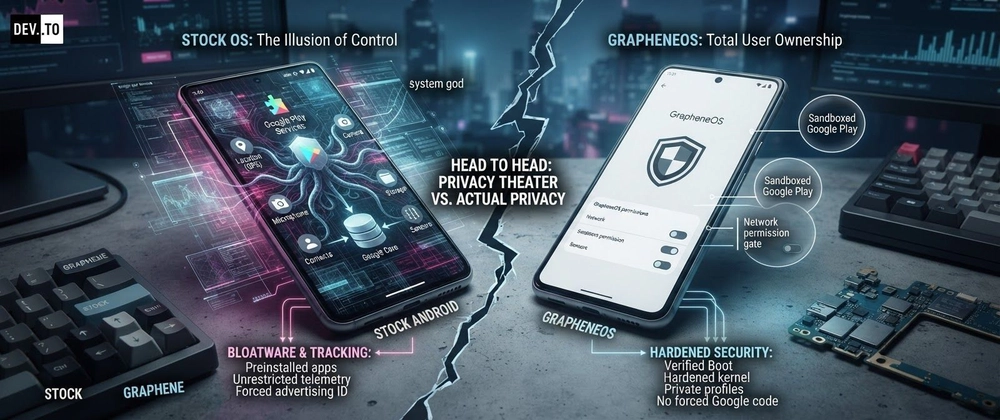
On Stock OS, Google Play Services runs as a privileged system app. It has access to your location, your sensors, your phone identifiers, and it can run in the background whenever it wants. You cannot revoke its network access. You cannot revoke its sensor access. Turning off "Location History" in your Google account does not stop low level collection.
On GrapheneOS, everything is permission based and actually enforced.
- Network permission toggle: You can deny any app network access completely. Stock Android has no such feature. On GrapheneOS you can have an offline calculator or photo editor that literally cannot phone home.
- Sensors permission: GrapheneOS lets you deny sensor access to apps. No more apps reading your accelerometer and gyroscope to fingerprint you.
- Contact Scopes and Storage Scopes: Instead of giving an app access to all your contacts or all your files, you give it access to only what it needs. Stock OS is all or nothing.
- No advertising ID by default: GrapheneOS does not expose a resettable advertising ID to apps. Stock OS does, even if you "reset" it.
This is the difference between privacy theater and actual privacy.
# On Stock OS, you can't do this without root
# On GrapheneOS, this is a simple toggle in App Info -> Permissions
# But you can also manage it via ADB if you want to script it:

adb shell cmd appops set com.example.shadyapp INTERNET deny
adb shell cmd appops set com.example.shadyapp ACCESS_RESTRICTED false
On Stock, an app either gets internet or it does not get installed. On GrapheneOS, you decide.
2. Security: Stock Is Good, GrapheneOS Is on Another Level
People think Pixel Stock OS is secure, and it is, compared to Samsung or Xiaomi. But GrapheneOS takes the Pixel's already great hardware security and pushes it way further.
Here is what GrapheneOS adds that Stock just does not have:
- Hardened kernel and hardened malloc: GrapheneOS uses its own hardened memory allocator that catches exploitation attempts that would succeed on Stock OS. This is huge for preventing zero-click exploits.
- Hardened WebView and browser: Vanadium, the default browser, is Chromium but significantly hardened. No Google sync bloat, better exploit mitigations.
- Exploit mitigations: Things like stricter SELinux policies, control flow integrity, and disabling of insecure legacy features.
- Verified Boot with custom keys: Unlike most custom ROMs that break Verified Boot, GrapheneOS keeps it fully intact and re-locks the bootloader with its own keys. You get the same tamper protection as Stock. Most other ROMs leave your phone wide open.
- Auto-reboot: GrapheneOS can automatically reboot after a period of inactivity, putting the device back into Before First Unlock state where data is fully encrypted and not accessible. This is a lifesaver against physical forensic tools. Stock does not have this.
- PIN scrambling and duress password: You can set a secondary password that wipes the device if you are forced to unlock it.
Stock OS was built to be secure enough to not get sued. GrapheneOS was built to resist real attackers.
3. Google Services: The Smart Way vs The Forced Way
This is the part that finally convinced me. I am not anti-Google. I use Gmail and Maps. I just do not want Google baked into my OS kernel.
On Stock OS, Google Play Services is a system-level god. You cannot uninstall it, you cannot sandbox it, you cannot limit it.
On GrapheneOS, you install Sandboxed Google Play from their Apps repository if you want it. And it runs like any other app:
- It has no privileged access
- You can deny it location, sensors, contacts, network, whatever
- You can put it in a separate user profile and keep your main profile completely Google-free
- Apps that depend on Google Play Services still work, but they talk to the sandboxed version
This is genius. You get compatibility without compromise. I keep banking apps and push notifications working through sandboxed Play in a secondary profile, while my main profile has no Google code at all.
# GrapheneOS user profiles are isolated like separate phones
# You can create a "Google" profile just for Play Services:

# Settings -> System -> Multiple users -> Add user
# Install Sandboxed Google Play only in that profile
# Your main Owner profile stays clean
On Stock, you cannot do this. Google is everywhere, all the time.
4. Updates and Longevity
Stock Pixels get 7 years of updates now, which is great. But GrapheneOS is often faster.
GrapheneOS pushes security patches and hardened updates sometimes even before Google pushes them to Stock, because they do not need to wait for carrier approval. Updates are seamless in the background and can be installed without trusting Google's servers.
And when Google drops support for an older Pixel, GrapheneOS often extends its life with continued security updates. You are not abandoned just because Google moved on to the next phone.
5. Bloat, Control, and Ownership
Stock OS comes with 20+ Google apps preinstalled. Some can be disabled, almost none can be fully removed. They run background services, they update themselves, they collect analytics.
GrapheneOS comes with almost nothing. No bloat. No Google apps unless you choose to install them. What you get is:
- Vanadium browser
- Auditor app for hardware attestation
- Secure Camera and Gallery
- AOSP apps that are minimal and permission-clean
It feels like you actually own the phone. Because you do.
6. The "But Does It Break My Apps" Myth
This is the biggest lie about GrapheneOS. People think nothing will work.
Reality: 99% of apps work flawlessly.
- Banking apps? Work fine, even with sandboxed Play. In fact, GrapheneOS often passes Play Integrity better than rooted Stock phones.
- Push notifications? Work via sandboxed Play or via the app's own push.
- Google Maps, YouTube, Gmail? Install them sandboxed and they work exactly like Stock, but without system privileges.
- SafetyNet / Play Integrity? GrapheneOS has a compatibility layer that lets most apps think they are on a certified device.
The only apps that truly break are ones that intentionally try to detect and block custom OSes, and even those are rare.
Performance and battery are also basically identical to Stock, since it is the same hardware and same base. In my opinion, it even feels a bit snappier without all the background Google junk constantly running.
Who Should Not Use GrapheneOS?
To be fair, it is not for everyone.
If you need absolute seamless Android Auto, or you rely on some weird carrier RCS features that depend on deep Google integration, Stock might be less hassle. Also, GrapheneOS only officially supports Pixels. If you are not on a Pixel 7 or newer, you cannot use it. That is intentional, they only support phones with proper hardware security.
But if you are on a Pixel and you care even a little about who controls your device, there is no reason to stay on Stock.
My Honest Take
Look, I get why people stay on Stock OS. It is easy, it is what the phone came with, and it does not ask you to think. But once you understand what is happening in the background, you cannot unsee it.
Stock OS treats you like a product. It gives you toggles that do not really toggle anything, permissions that do not really restrict Google, and a sense of control that is mostly an illusion.
GrapheneOS treats you like the owner. It gives you real toggles. Real permissions. Real ownership. It does not preach, it just gives you the tools and gets out of your way.
In my view, if you already own a Pixel, keeping Stock OS is like buying a high security safe and leaving the key taped to the front door. GrapheneOS is just locking that door properly.
I switched and I am not going back. If privacy and security matter to you even a little, you should at least try it. The installer is web-based and takes like 5 minutes.


Top comments (0)